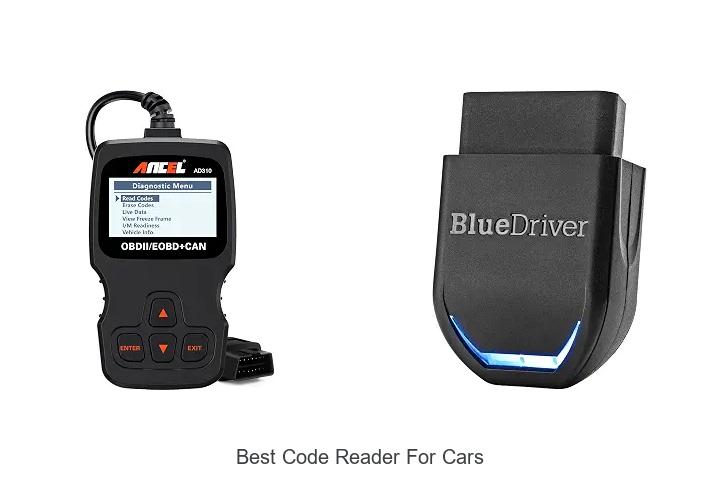
10 Best Code Reader for Cars Our Favorite Picks Compared
As an Amazon Associate, I earn from qualifying purchases. This post contains affiliate links. Which means I may earn a small commission when make a purchase through my links, at no additional cost to you.
Troubleshooting car problems often starts with understanding what’s causing that warning light to appear on your dashboard. Without the right tools, finding the issue can be frustrating and time-consuming.
This is where a reliable device becomes helpful. The best code reader for cars can quickly identify error codes and provide useful information to help you decide what needs fixing. Whether you’re a casual driver wanting to avoid unnecessary trips to the mechanic or someone who prefers handling basic repairs yourself, having a dependable code reader can save time and money.
This review will explore some of the most trusted car code readers available, highlighting what makes them stand out. You’ll learn about features, ease of use, and how each model performs in real-world situations.
Unlock Hidden Vehicle Insights with These Top Diagnostic Tools
| Image | Product | Price |
|---|---|---|
Pick 1  | ANCEL AD310 Universal OBD II Scanner | Check Price On Amazon |
Pick 2  | BlueDriver OBD2 Bluetooth Scanner | Check Price On Amazon |
Pick 3  | ANCEL AD530 OBD2 Diagnostic Scanner | Check Price On Amazon |
1. ANCEL AD310 Universal OBD II Scanner
When your car’s check engine light comes on, quick diagnosis is essential. The ANCEL AD310 Classic is a reliable scanner praised for its accuracy and ease of use.
It reads and clears error codes for vehicles from 1996 onwards, making it versatile for many drivers. This tool can display live data, freeze frames, and monitor I/M readiness, helping you better understand your car’s health.
The compact, lightweight design with a sturdy 2.5-foot cable makes it practical for use in tight spaces and on the go. Its clear display and labeled buttons simplify navigation without requiring special knowledge. Powered directly from the vehicle’s OBDII port, it never needs batteries or charging.
By quickly identifying engine and emission issues, it helps users save time and avoid unnecessary trips to the mechanic. The AD310 is well-suited to car owners and mechanics who want an efficient, affordable way to troubleshoot problems and maintain vehicle performance.
Pros
- Easy to use with clear screen and buttons
- Reads and clears engine trouble codes fast
- No batteries or charger needed
Cons
- Limited update options
- Display resolution could be sharper
- Does not support advanced diagnostics
Who Should Buy It?
Ideal for drivers and DIY mechanics seeking a straightforward tool to diagnose and clear common engine codes on most vehicles made since 1996.
Key Specifications
| Specification | Details |
|---|---|
| Brand | ANCEL |
| Model | AD310 |
| Operating System | Linux |
| Screen Size | 2.4 inches |
| Power Source | Corded Electric |
| Diagnostic Functions | Read and clear error codes, view live data, freeze frame, I/M readiness |
| Included Components | 1* AD310 OBD2 Scanner, 1* User’s Manual |
| Compatibility (Year/Protocol) | 1996 or newer OBD2 protocol vehicles |
The ANCEL AD310 runs on a Linux-based system, providing stability and efficiency during diagnostics. Its 2.4-inch screen shows results clearly, helping users read codes and live data without confusion. Powered directly through the vehicle’s OBDII port, the scanner avoids extra battery costs or battery replacement hassles. The included cable length allows flexibility when connecting under the hood, and the package comes with a user manual for easy setup. Suitability for vehicles from 1996 onwards ensures compatibility with most modern cars, making it a practical choice for many drivers.
These specs translate to a scanner that offers precise, fast diagnostics and straightforward operation. The direct power supply means it’s always ready to use, reducing downtime. Its sturdy build, combined with the compact form and clear interface, improves comfort during troubleshooting. While it lacks advanced features like software updates or manufacturer-specific diagnostics, its reliable performance and broad compatibility benefit casual users and home mechanics needing a no-fuss solution for engine code reading and clearing.
2. BlueDriver OBD2 Bluetooth Scanner
Unlock the power to diagnose your vehicle with confidence and ease. This scanner transforms your smartphone into a comprehensive diagnostic tool that reads and clears trouble codes effortlessly. BlueDriver Pro offers professional-grade diagnostics without subscription fees, delivering reliable insights on engine, ABS, SRS, TPMS, transmission, and more for supported vehicles.
Enhanced coverage includes the latest models, providing real-time data and freeze frame analysis as you drive. The scanner connects wirelessly via Bluetooth, eliminating cable clutter and hardware fuss. Its detailed VIN-specific repair reports include verified fixes, making it easy to avoid unnecessary repairs.
BlueDriver supports numerous makes, including GM, Ford, Toyota, Honda, Nissan, and European brands, ensuring broad vehicle compatibility. Designed for gas-powered vehicles from 1996 onward, plus select light-duty trucks and diesels, it suits daily drivers and truck owners alike.
Setup is simple, while the included app offers intuitive controls. The build is sturdy, designed for frequent use and heavy vehicle diagnostics.
Overall, it delivers exceptional value for anyone looking to handle car issues confidently without professional intervention. It is ideal for DIY mechanics and drivers wanting detailed, trustworthy diagnostics at home or on the road.
Pros
- Extensive vehicle and code coverage
- Technician-verified repair reports
- Wireless Bluetooth connectivity
Cons
- No subscription may limit some advanced features
- Compatibility varies on very recent models
- Requires smartphone for full functionality
Who Should Buy It?
Vehicle owners seeking a versatile, easy-to-use diagnostic tool will benefit most. It fits those wanting in-depth codes and repair info without costly subscriptions. Ideal for drivers of gas cars and light trucks, plus home mechanics wanting professional insights quickly.
Key Specifications
| Specification | Details |
|---|---|
| Brand | BlueDriver |
| Model | Pro |
| Operating System | iOS and Android |
| Power Source | Vehicle |
| Diagnostic Functions | Check Engine, ABS, SRS, TPMS, Transmission, Freezing Frame, Mode 6 |
| Included Components | BlueDriver OBD2 Scanner, Access to BlueDriver App |
| Compatibility (Year/Protocol) | Gas Vehicles 1996+ and Select Light-Duty Trucks |
| Update Availability | Yes |
The BlueDriver Pro is designed for use with iOS and Android smartphones, connecting wirelessly via Bluetooth for hassle-free scanning. It plugs directly into the vehicle’s OBDII port, which is standard on gas-powered cars and light trucks manufactured since 1996. This wide compatibility means the scanner works with most family vehicles and certain diesel trucks, covering a broad range of models from popular manufacturers like Ford, Toyota, and Mercedes-Benz. Included components comprise the scanner itself and free access to the BlueDriver diagnostic app, simplifying setup and use.
These specifications ensure the scanner performs detailed diagnostics, offering readings beyond basic check engine codes. Users receive real-time data and technician-verified repair reports tailored to their specific vehicle. The wireless Bluetooth connection enhances convenience by eliminating wires and the need for separate screen devices. Frequent software updates keep the tool compatible with newer cars and enhanced features, making it durable and practical for ongoing automotive troubleshooting. This setup serves well for everyday drivers and those wanting detailed insights without professional help.
3. ANCEL AD530 OBD2 Diagnostic Scanner
The ANCEL AD530 OBD2 Diagnostic Scanner stands out with its user-friendly interface and advanced diagnostic capabilities. It brings detailed engine insights and battery voltage checks right to your fingertips, making at-home car care straightforward.
This scanner works with 1996 and newer vehicles, providing quick access to fault codes along with simple explanations. Its plug-and-play design means no complicated setup is required.
A key feature is the one-touch I/M Readiness check, letting users easily prepare for emissions testing. Beyond basic error codes, it offers data on oxygen sensors, EVAP systems, and emission monitors.
Real-time monitoring of battery voltage helps spot charging system problems before they grow. The 2.8-inch color screen presents live graphs and freeze frame snapshots clearly.
It has a solid built with reliable scanning accuracy housing over 100,000 DTCs in its database. This tool suits owners who want detailed diagnostics without needing a mechanic yet prefer a premium device with lifetime free updates for Windows PCs.
It delivers excellent value by combining thorough data with easy operation.
Pros
- User-friendly plug-and-play setup
- Clear 2.8-inch color live data screen
- Comprehensive error code explanations
Cons
- Updates only support Windows, no macOS
- Limited screen resolution at 320×240
- No wireless connectivity options
Who Should Buy It?
Ideal for car owners seeking a premium scanner with detailed diagnostics. Best suited for those who prefer fast, clear fault code interpretation and real-time battery monitoring. Recommended for DIYers that use Windows PCs and want a tool that covers broad OBDII functions without extra apps or complex setup.
Key Specifications
| Specification | Details |
|---|---|
| Brand | ANCEL |
| Model | AD530 |
| Operating System | Windows 7/8/10/11 |
| Screen Size | 2.8 inches |
| Power Source | Battery Powered |
| Diagnostic Functions | Read/Clear Fault Codes; I/M Readiness; Real-Time Data; Battery Voltage Monitoring; O2 Sensor & EVAP Tests |
| Included Components | 1*ANCEL AD530, 1*User Manual |
| Compatibility (Year/Protocol) | Universal Fit for 1996+ Cars |
| Update Availability | Lifetime Free Updates (Windows only) |
The ANCEL AD530 includes a 2.8-inch color display with a native resolution of 320 by 240 pixels. This size strikes a good balance between portability and readability, allowing users to view live data graphs and fault code details with clarity. Being battery powered enhances its mobility, as you do not need external power connections during use. The device supports universal 1996 and newer OBDII vehicles, making it compatible with most cars on the road today. Its plug-and-play design means it operates without complex configurations, perfect for quick diagnostics at home or on the go.
Operating on Windows 7 through 11 ensures that users receive lifetime free updates, helping maintain diagnostic accuracy over time. Its inclusion of advanced OBDII modes like O2 sensor and EVAP tests provides a richer data set than basic code readers. However, the scanner’s resolution limits detailed graphical displays and it lacks wireless features, which may affect convenience for some users. Still, it offers reliable performance and a sturdy build, making it suitable for car owners who want comprehensive diagnostic capabilities integrated into a straightforward handheld tool.
4. FOXWELL NT604 OBD2 Diagnostic Scanner Tool

Pinpointing vehicle issues across multiple key systems becomes swift and clear with this FOXWELL diagnostic scanner. It combines broad OBDII coverage with four-system diagnostics for engine, ABS, SRS, and transmission, all in one device. This model excels at delivering detailed diagnostic information immediately after a single scan, supporting efficient troubleshooting and cost-saving repairs.
The tool’s screen shows clear, easy-to-understand codes and live data in real time, helping users avoid dealership expenses. Automatic VIN recognition simplifies setup by identifying the vehicle during connection.
With features like diagnostic report generation and lifetime software updates, it stays relevant as vehicle technology advances. The device is built for durability and ease, featuring a 4.3-inch vibrant screen and plug-and-play power source for quick connection and long usage sessions. Included cables, a carrying case, and comprehensive manual enhance its practical value.
This scanner suits vehicle owners wanting deep insight into faults beyond engine codes, ideal for those managing brake, airbag, or transmission issues themselves or before professional service.
Pros
- Four-system diagnostic capabilities
- Automatic VIN identification
- Generates repair shop diagnostic reports
Cons
- Can’t erase codes until problems are fixed
- Screen resolution could be higher
- Limited to OBDII protocol vehicles
Who Should Buy It?
People who need detailed diagnostics for multiple car systems will benefit most. It’s ideal for DIYers and mechanics wanting to save on repair costs by accurately identifying issues before visiting a shop.
Key Specifications
| Specification | Details |
|---|---|
| Brand | FOXWELL |
| Model | NT604Elite-b |
| Operating System | Easy to Use |
| Screen Size | 4.3 inches |
| Power Source | Plug and Play |
| Diagnostic Functions | Engine, ABS, SRS, Transmission, OBDII Full Function |
| Included Components | Diagnostic Cable, Foxwell NT604E Scan Tool, Quick Guide, USB Cable, User Manual |
| Compatibility (Year/Protocol) | Universal Fit, OBDII Protocol |
| Update Availability | Lifetime Updates |
The 4.3-inch screen offers a clear and concise interface for viewing diagnostic information, making it easy to read fault codes and live data. Its plug-and-play power source means no complex setup or external batteries are needed—simply connect to the vehicle’s OBDII port. The scanner works with all OBDII compliant vehicles, which generally includes cars from 1996 onward, and identifies the vehicle automatically using the VIN, simplifying usage for non-experts.
These specifications result in a diagnostic tool that performs efficiently and reliably, delivering extensive system coverage beyond just engine codes. Its full OBDII function ensures compatibility across many car makes and models. The device’s durable build and included accessories mean it fits well into a mechanic’s toolkit or a car owner’s garage. Users looking for both simplicity and multi-system insights will find the NT604 suitable for frequent use with easy updates to maintain effectiveness.
5. ANCEL AD410 OBD2 Scanner

Understanding a check engine light is simpler with this OBD2 scanner. It provides clear codes and definitions to help drivers diagnose car issues quickly. The ANCEL AD410 OBD2 Scanner offers more than just identifying fault codes.
It supports live data monitoring, freeze frame data, I/M readiness status, and tests for O2 sensors and EVAP systems. Over 42,000 built-in DTCs provide extensive diagnostic support. The device’s 2.4-inch screen shows real-time engine data such as RPM, coolant temperature, and fuel trims, allowing better insight into vehicle health.
The compact, lightweight design fits comfortably in the hand, making it easy to use in any environment. It has a straightforward interface suited for beginner and DIY users. The scanner also confirms repairs before returning to the mechanic or emissions test.
Its corded electric power source ensures consistent operation without needing batteries. Given its features, this tool is ideal for drivers wanting to handle basic car diagnostics themselves and avoid unnecessary service visits. It offers strong functionality at an accessible level, balancing ease and capability.
Pros
- Extensive 42,000+ DTC database
- Real-time engine data display
- Simple to use for beginners
Cons
- Screen size is small at 2.4 inches
- Corded operation limits mobility
- No wireless connectivity option
Who Should Buy It?
This scanner suits everyday drivers and DIY mechanics who want to read and clear engine codes without complex tools. It’s perfect for those needing basic diagnostics and real-time data without spending on advanced scanners. Users looking to verify repairs or check emissions readiness will also find this device useful.
Key Specifications
| Specification | Details |
|---|---|
| Brand | ANCEL |
| Model | AD410 |
| Operating System | Linux |
| Screen Size | 2.4 inches |
| Power Source | Corded Electric |
| Diagnostic Functions | Read/Clear Codes, Live Data, Freeze Frame, I/M Readiness, O2 Sensor Test, EVAP Test, Vehicle Info, MIL Status |
| Included Components | 1 * AD410, 1 * User Manual, 1 * USB Cable |
| Compatibility (Year/Protocol) | All OBDII Cars 1996+ |
| Update Availability | Not Specified |
The ANCEL AD410 features a 2.4-inch screen that clearly displays diagnostic data and live vehicle parameters. Its corded electric power source provides stable energy without battery concerns. Running on Linux, it offers a reliable and user-friendly interface. Compatibility with all OBDII-compliant cars from 1996 onwards ensures broad vehicle support. Included components like the USB cable and user manual assist with setup and updates. These specs make the tool suitable for basic use and straightforward diagnostics at home or on the go.
These specifications contribute to accurate real-time monitoring and fault identification. The small screen is sufficient for displaying codes and vehicle info, maintaining compactness. The corded design means users don’t need to worry about battery life during diagnostics, ideal for longer sessions. Inclusion of freeze frame data and emissions readiness checks supports thorough evaluation of vehicle health. Beginners benefit from accessible diagnostics without complicated setups, while DIY hobbyists gain helpful real-time engine insights.
6. FOXWELL NT301 OBD2 Diagnostic Code Reader

Engine diagnostics become straightforward with the FOXWELL NT301 OBD2 scanner, which targets professional-level engine code reading. It enables quick access to trouble codes and live data, making check engine light issues easier to understand and resolve. The scanner plugs directly into a vehicle’s 16-pin OBD2 port and is suitable for both newcomers and experienced DIY mechanics.
It reads and clears engine trouble codes, providing definitions to help clarify potential problems. A one-click I/M Readiness hotkey reports vehicle inspection readiness with clear LED indicators and sounds.
Real-time engine data can be viewed and graphed, including parameters like engine RPM and coolant temperature. Updates require a Windows-compatible system, and the compact device includes a USB cable and a quick reference guide. While it supports most OBD2 protocols and vehicles with a 16-pin port, Mac and iOS system updates are not supported.
Overall, this scanner delivers reliable diagnostics at a reasonable size, offering detailed insights into engine health. Its straightforward interface and helpful features make it valuable for users who want to monitor repairs and prepare for inspections confidently.
Pros
- Clear engine code definitions
- One-click readiness check with LED alerts
- Real-time live data graphing
Cons
- No Mac or iOS update support
- Display screen is relatively small
- Permanent DTCs cannot be cleared immediately
Who Should Buy It?
Ideal for DIY mechanics and car owners needing professional engine code diagnostics. It suits users who prefer clear code definitions and live data viewing for better fault analysis. Those preparing vehicles for emission or safety inspections will also benefit.
Key Specifications
| Specification | Details |
|---|---|
| Brand | FOXWELL |
| Model | NT301 |
| Operating System | Windows (for updates) |
| Screen Size | 2.8 inches |
| Power Source | Corded Electric |
| Diagnostic Functions | Read, clear, and graph engine trouble codes; I/M Readiness check |
| Included Components | NT301 scanner, USB cable, quick reference guide |
| Compatibility (Year/Protocol) | Universal fit for OBD2 16-pin vehicles |
| Update Availability | Via Windows OS |
The FOXWELL NT301 scanner operates by connecting to a vehicle’s standard 16-pin OBD2 port, making it widely compatible with most cars and light trucks that support OBD2 protocols. Its 2.8-inch screen shows clear data, which is easy to read during diagnostics. The USB corded power source ensures continuous use without needing batteries, and the included USB cable allows for firmware updates and data transfer on Windows computers. The device comes with a quick reference guide, aiding users in navigating its features effortlessly.
These specifications support effective and continuous vehicle diagnostics, especially useful for users wanting to monitor engine problems in real time. While the 2.8-inch screen is compact and portable, it limits how much information can be displayed at once but remains adequate for clear data viewing. Reliance on Windows OS for updates may restrict convenience for Mac or mobile users. Overall, this setup benefits mechanics and owners who want a reliable, simple tool for daily checks and repair confirmation.
7. MOTOPOWER MP69033 Car OBD2 Scanner

Affordable and easy to use, the MOTOPOWER MP69033 Car OBD2 Scanner offers practical diagnostics without breaking the bank. It supports a wide range of vehicle protocols, making it suitable for many cars since 1996.
Featuring a 2.8-inch LCD screen with backlight and adjustable contrast, it provides clear readouts of codes and live data. The built-in code lookup library helps identify engine light causes quickly and accurately.
Although it does not support ABS or airbag systems, it handles engine faults effectively. Powered directly from the car’s OBDII connector, there’s no need for batteries or charging.
The compact design and durable cable add convenience during use. Six buttons allow easy navigation through menus, including a quick query for VIN and fault codes. Overall, it delivers solid performance for those who want affordable, straightforward engine diagnostics, especially DIYers and budget-conscious drivers.
Pros
- Affordable and practical for basic diagnostics
- Supports multiple OBDII protocols and languages
- Clear 2.8-inch backlit LCD screen
Cons
- Cannot read ABS or airbag codes
- Limited to engine diagnostics only
- No wireless or app connectivity
Who Should Buy It?
Ideal for drivers seeking a budget-friendly scanner to diagnose engine issues. Great for DIY mechanics and owners of most OBDII-compliant vehicles who need quick fault reading and clearing without advanced features.
Key Specifications
| Specification | Details |
|---|---|
| Brand | MOTOPOWER |
| Model | MP69033 |
| Operating System | Windows |
| Screen Size | 2.8 inches |
| Power Source | Powered by vehicle via OBDII connector |
| Diagnostic Functions | Read/erase engine codes, view live data, freeze frame, I/M readiness, vehicle info |
| Included Components | Battery |
| Compatibility (Year/Protocol) | Compatible with 1996 US, 2000 EU, Asian cars, supports 9 protocols |
The MOTOPOWER MP69033 features a 2.8-inch backlit LCD that ensures clear visibility even in low light. It connects directly to the vehicle’s OBDII port, drawing power without the need for batteries or external charging. Being compatible with nine OBDII protocols, it supports a wide variety of vehicles from 1996 onwards, including US, European, and Asian models. The inclusion of a battery is mainly for internal functions, and the scanner’s six buttons make navigation straightforward and efficient during diagnostic tasks.
These specifications translate to quick and reliable access to engine fault codes, live vehicle data, and readiness status for emissions tests. The direct vehicle power source prevents interruptions during use, while the robust 2.5 feet cable enhances durability and ease of handling. This setup suits casual users and those new to car diagnostics who want a tool that is simple to set up, operate, and maintain without frills like wireless updates or ABS/airbag code reading.
8. FOXWELL NT604 Elite Car OBD2 Scanner

Cars with warning lights for the engine, ABS, airbag, or transmission systems need clear diagnostics to avoid costly repairs. The FOXWELL NT604 Elite Car OBD2 Scanner offers in-depth four-system diagnostics, extending beyond basic code readers.
It reads and clears trouble codes for Engine, Transmission, ABS, and SRS, providing a complete overview of these systems on supported vehicles. Users benefit from live data monitoring and detailed ECU information, which assists in diagnosing problems more accurately.
A quick scan function offers a snapshot of key modules, while real-time graphing helps spot issues early. Its 4.3-inch color screen with physical buttons makes navigation straightforward without relying on apps or Bluetooth.
Built with durability in mind, the scanner comes with a sturdy carrying case protecting the device and cables during transport. With easy plug-and-play use and free Wi-Fi updates, vehicle compatibility can improve over time.
This tool is designed for owners and mechanics who seek reliable diagnostics across multiple car systems, making it a practical investment for proactive care.
Pros
- Supports Engine, Transmission, ABS, and Airbag systems
- Live data monitoring with graph and save features
- No phone or app needed; standalone operation
Cons
- Compatibility varies with vehicle make and model
- Screen resolution modest by modern standards
- Limited to compatible OBD2 protocols
Who Should Buy It?
Ideal for car owners and mechanics needing detailed diagnostics for multiple systems. Those wanting a reliable, standalone scanner for everyday troubleshooting will benefit most.
Key Specifications
| Specification | Details |
|---|---|
| Brand | FOXWELL |
| Model | NT604 Elite |
| Operating System | Linux |
| Screen Size | 4.3 inches |
| Power Source | Corded Electric |
| Diagnostic Functions | Engine, Transmission, ABS, SRS Airbag codes and live data |
| Included Components | Diagnostic Cable & USB Cable, Quick Start Guide, Protective Box, User Manual, Scan Tool |
| Compatibility (Year/Protocol) | Varies by vehicle make, model, year, engine, ECU, system |
| Update Availability | Free Wi-Fi software updates |
The FOXWELL NT604 Elite scanner uses a 4.3-inch color screen with physical buttons, delivering clear visuals without needing a smartphone or app. Its Linux operating system supports stable performance during diagnostics. The corded electric power source plugs directly into the vehicle’s OBD2 port, ensuring reliable operation without battery worries. Included components such as a diagnostic and USB cable, quick start guide, user manual, and sturdy carrying case provide a complete setup right out of the box. Compatibility varies widely, so users should confirm vehicle support before purchase to maximize usefulness.
These specifications translate to practical use, as the scanner can quickly identify trouble codes in four critical automotive systems, helping users diagnose issues more comprehensively. The absence of app or Bluetooth dependencies simplifies setup and makes the device ready to work immediately. Live data visualization and the ability to save and graph information aid professionals and DIYers in pinpointing malfunctions. A robust carrying case adds convenience and durability for technicians working in various environments, making it especially valuable for workshop or roadside diagnostics.
9. Innova 5610 OBD2 Bidirectional Scan Tool
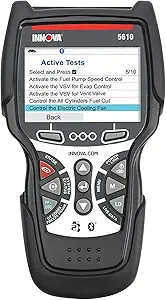
A professional-grade scan tool with advanced diagnostic capabilities simplifies complex car repairs. It offers detailed live data and bidirectional commands to update vehicle systems effectively.
The Innova 5610 OBD2 Bidirectional Scan Tool excels in providing a clear understanding of vehicle issues while supporting advanced troubleshooting. It enables users to access both OBD2 and OEM live data streams, including ABS, SRS, transmission, and engine. The special reset functions replicate dealership-level re-learn procedures to complete repairs accurately.
The device ensures real-time testing by sending commands to fuel pumps or electronic parking brakes. Built with a compact, portable design, and a user-friendly interface, it supports multiple languages. This tool suits professional mechanics or experienced DIYers working on vehicles from 1996 up to the 2023 model year.
Reliable US-based technical support and continuous updates add value for long-term use. Its compatibility with select car makes ensures precise diagnostics but limits universal usage.
Overall, it offers pro-level functionalities with ease of use for those needing detailed vehicle insights and sophisticated repair processes.
Pros
- Supports bidirectional control for precise vehicle testing
- Accesses enhanced live data on ABS, SRS, and transmission
- Includes updates and US-based technical support
Cons
- Not compatible with all vehicle makes and models
- Screen size may feel small for detailed data viewing
- Limited multi-language support beyond English, Spanish, French
Who Should Buy It?
Ideal for professional mechanics or experienced car owners seeking advanced, bidirectional diagnostic tools. Great for troubleshooting complex issues and performing dealership-level resets on compatible vehicles. Not designed for casual users wanting basic code reading functionality.
Key Specifications
| Specification | Details |
|---|---|
| Brand | Innova |
| Model | 5610 |
| Operating System | iOS and Android |
| Screen Size | 3.5 inches |
| Power Source | Vehicle Powered |
| Diagnostic Functions | OBD2 and OEM live data, ABS, SRS, transmission, engine, bidirectional control |
| Included Components | Code Reader with Protective Boot, Manual, OBD2 Cable, Soft Pouch, USB Cable |
| Compatibility (Year/Protocol) | Most 1996-2023 OBD2 vehicles (2024 support coming soon) |
| Update Availability | Included |
The Innova 5610 features a 3.5-inch screen that displays real-time data from various vehicle systems with clear visibility. It is powered directly from the vehicle, so there is no need for batteries or external power sources. Compatibility covers most OBD2 vehicles from 1996 through 2023, with 2024 models soon supported. This tool supports iOS and Android operating systems, broadening accessibility. Included components such as a protective boot and soft pouch help ensure durability and ease of transport when diagnosing cars on the go or in the workshop.
Performance benefits from bidirectional control, allowing the scan tool to send commands to critical components like the fuel pump and parking brake. The ability to read OEM-specific live data including ABS and transmission details enables more precise diagnosis and repair. Continuous software updates maintain relevance with newer vehicle models and standards. Its compact design and simple interface make setup and daily use straightforward. Professionals and serious car owners gain most, as the tool offers advanced functions useful in complex repair scenarios, improving accuracy and repair efficiency.
10. Innova 5210 OBD2 Scanner and Engine Code Reader

Combining OBD2 scanning and battery testing, this tool offers more than basic diagnostics. It provides detailed engine data and maintenance functions in one compact device. The Innova 5210 reads and clears check engine and ABS codes while also checking battery health and alternator performance.
It covers most US, Asian, and European vehicles from 1996 onwards, supporting a wide range of makes. The live data feature shows real-time engine metrics like RPM and engine temperature.
It also includes oil light reset and drive cycle readiness to confirm emissions test preparation. The handheld unit pairs with the RepairSolutions2 app, giving verified fixes and repair guidance at no extra cost.
Its sturdy build and intuitive interface suit both DIYers and mechanics seeking reliable and versatile diagnostics. This product blends functionality and ease of use, making it a smart tool for anyone wanting thorough car health monitoring without subscriptions.
Pros
- Combines OBD2 scanner and battery tester
- Live data and real-time diagnostics
- Free app with verified repair fixes
Cons
- ABS code coverage may vary
- Screen size is relatively small
- Compatibility needs prior verification
Who Should Buy It?
Ideal for vehicle owners wanting a two-in-one diagnostic and battery tool. Fits DIYers and mechanics who need easy access to live data and repair guides. Users with cars from 1996 or newer will benefit most.
Key Specifications
| Specification | Details |
|---|---|
| Brand | Innova |
| Model | 5210 |
| Operating System | iOS and Android |
| Screen Size | 2.8 inches |
| Power Source | Vehicle Powered |
| Diagnostic Functions | OBD2 engine and ABS code reading, battery tester, oil reset, live data, smog check readiness |
| Included Components | Code Reader with attached OBD2 Cable, Quick Start Guide |
| Compatibility (Year/Protocol) | Most US, Asian, and European vehicles from 1996 and newer |
| Update Availability | No subscriptions, app updates available |
The Innova 5210 features a 2.8-inch screen that displays clear diagnostic information in real time. It connects directly to a vehicle’s OBD2 port to scan engine and ABS trouble codes. Its battery testing ability checks alternator performance to avoid unexpected failures. Compatible with iOS and Android devices, the scanner pairs with a mobile app for detailed repairs and instructions. It fits a broad range of cars made from 1996 onward, including popular brands like Toyota and Ford. The unit draws power from the vehicle itself, so no batteries are required.
These specifications ensure reliable performance for quick diagnostics and maintenance checkups. The app integration adds value by delivering verified repair guides without extra fees. Its size and handheld design offer portability and ease of setup. Vehicle owners benefit most by using this device for ongoing engine monitoring and battery health assessments. Mechanics appreciate its detailed live data readings and oil light reset feature, speeding up routine services. However, users should verify ABS code coverage and compatibility beforehand for best results.
Unlock Hidden Car Secrets: Your Ultimate Guide to the Best Code Readers for Cars
Compatibility with vehicle models
Understanding the range of supported car makes and models is crucial for ensuring a diagnostic tool works effectively across different vehicles. Many devices are designed to work with either OBDI or OBDII protocols, with OBDII being the standard for most vehicles manufactured after
However, older cars that rely on OBDI may not be compatible with tools that solely focus on newer protocols, so verifying compatibility with both systems can prevent frustrating limitations.
Domestic vehicles and imported models often use varying diagnostic standards and communication protocols, which can affect the ability of a scanner to read codes accurately. Some tools specialize in American brands, while others are tailored to handle European or Asian imports, where manufacturer-specific codes may be involved.
| Vehicle Type | Protocol | Diagnostic Coverage | Notes |
|---|---|---|---|
| Older Domestic Cars | OBDI | Limited | Requires specific OBDI compatibility |
| Modern Domestic Cars | OBDII | Extensive | Widely supported |
| Imported Vehicles | OBDII + Manufacturer-specific | Varies | May need enhanced protocol support |
Types of code readers
Understanding how a diagnostic tool interfaces with your vehicle and other devices can greatly impact its effectiveness and ease of use. Basic code readers typically offer straightforward functionality, providing essential trouble codes but often lack wireless capabilities or support for additional features.
Additionally, Bluetooth and wireless models have become popular for their convenience, allowing seamless integration with smartphones and tablets via dedicated apps, which often include real-time data sharing and software upgrades.
| Type | Features | Connectivity Options | Benefits |
|---|---|---|---|
| Basic Code Readers | Simple code retrieval, limited data | Wired only | Affordable, easy to use for basic diagnostics |
| Advanced Scan Tools | Comprehensive diagnostics, multiple system scans | USB, Wi-Fi | In-depth analysis, software updates, enhanced functionality |
| Bluetooth/Wireless Readers | App integration, live data streaming | Bluetooth, Wi-Fi | Wireless convenience, real-time monitoring, mobile device compatibility |
Choosing a device that offers flexible connection options and the ability to expand functionality through apps or software updates can save time and provide greater insight into vehicle issues. This ensures the tool remains relevant as automotive technology evolves and diagnostic needs grow more complex.
Features and functionalities
Devices that can read and clear trouble codes offer more than just basic fault identification; they provide essential insights that help diagnose vehicle issues accurately. Beyond reading engine codes, advanced units often display live data streams and freeze frame information, allowing users to monitor real-time performance and review snapshots of sensor readings at the time a fault occurred.
This level of detail helps pinpoint problems faster and makes repairs more efficient.
Additional diagnostic features greatly enhance the value of these tools. Support for systems like ABS (Anti-lock Braking System), SRS (Supplemental Restraint System), and transmission diagnostics means a more comprehensive overview of the vehicle’s health. This expanded functionality ensures that safety and drivability concerns are also addressed, not just engine-related issues.
This expanded functionality ensures that safety and drivability concerns are also addressed, not just engine-related issues.
User interface and ease of use
The quality of the interface plays a crucial role in how effectively a diagnostic tool communicates information to the user. A clear, well-sized display ensures that error codes and diagnostic data are easy to read, reducing eye strain and speeding up the troubleshooting process.
Intuitive menu navigation allows users of all skill levels to quickly access vital functions without confusion, making the overall experience smoother. Additionally, multilingual support broadens accessibility, enabling non-English speakers to fully understand and utilize the device without language barriers. These elements together determine how effortlessly one can interact with the gadget, ultimately impacting its usefulness in everyday vehicle diagnostics.
Connectivity and software support
Devices that offer seamless integration with mobile apps provide a significant advantage, allowing users to easily access diagnostic data and receive real-time updates right from their smartphones or tablets. Regular firmware updates are crucial for keeping the tool compatible with the latest vehicle models and improving its functionality over time. Additionally, having multiple options for exporting diagnostic information—such as USB, Bluetooth, or cloud storage—enables more convenient sharing, analyzing, and record-keeping, which can be especially helpful for both DIY users and professional mechanics.
Additionally, having multiple options for exporting diagnostic information—such as USB, Bluetooth, or cloud storage—enables more convenient sharing, analyzing, and record-keeping, which can be especially helpful for both DIY users and professional mechanics.
Price and warranty considerations
Modern automotive diagnostic tools often come equipped with various connection options and the ability to support additional features or devices, making them far more versatile and future-proof. Devices that offer multiple ways to interface—such as Bluetooth, USB, or OBD-II compatibility—ensure seamless communication with different vehicle systems and mobile apps.
Compatibility with a wide range of vehicle makes and models also plays a critical role in maximizing utility. Without these capabilities, the tool could quickly become outdated or insufficient for more advanced diagnostics.
Investing in a unit that supports extensive integration means tackling a variety of diagnostics without running into compatibility roadblocks, saving both time and expense down the line.
Setting Up a Car Code Reader for Accurate Results
Using a car code reader can help diagnose issues quickly. Setting it up correctly improves the accuracy of the results. Begin by reading the user manual that comes with your device. Each model may have specific steps to follow.
Next, locate the vehicle’s OBD-II port. This port is usually found under the dashboard near the steering column. Plug the code reader into this port firmly but gently.
Turn on your vehicle’s ignition, but you don’t need to start the engine in most cases. Power on the code reader. Wait for it to establish a connection with the vehicle’s computer system. This might take a few seconds.
Follow the screen prompts to scan for trouble codes. When the scan completes, the reader will display diagnostic trouble codes (DTCs). These codes help identify issues with various vehicle systems.
Here are a few tips for better results:
- Ensure your vehicle’s battery is charged. A low battery can cause errors during scanning.
- Make sure the connection between the reader and port is secure to avoid interruptions.
- Use the reader in a well-lit area so you can easily read the display and instructions.
- Keep the vehicle off during initial connection if instructed by your device’s manual.
- Clear any codes after reading them to reset the system. Monitor if codes reappear, indicating ongoing problems.
Following these steps makes the process smoother and helps you get useful information about your car’s condition. Routine scans can aid in timely repairs and maintenance.
FAQ’s
What Features Should I Look For In The Best Code Reader For Cars?
The best code reader for cars should support a wide range of vehicle makes and models, provide real-time diagnostic data, and offer user-friendly interfaces with clear error code explanations. Additionally, features like live sensor readings, freeze frame data, and Bluetooth connectivity for smartphone integration enhance usability and convenience.
Which Car Code Readers Are Most Compatible With A Wide Range Of Vehicle Makes And Models?
Car code readers like the BlueDriver and Autel MaxiCOM series are highly compatible with a wide range of vehicle makes and models. These devices support extensive OBD-II protocols and provide comprehensive diagnostics for both domestic and international cars.
How Do Professional-Grade Code Readers Differ From Basic Obd-Ii Scanners?
Professional-grade code readers offer advanced diagnostic features like live data streaming, bi-directional control, and manufacturer-specific codes, while basic OBD-II scanners primarily read and clear generic trouble codes. Additionally, professional tools often provide more detailed troubleshooting information and support for a wider range of vehicle systems.
What Are The Top-Rated Budget-Friendly Code Readers For Diy Car Diagnostics?
Top-rated budget-friendly code readers for DIY car diagnostics include the Autel AutoLink AL319 and the BlueDriver Bluetooth Pro OBDII scanner. Both offer reliable basic trouble code reading and clear data, making them ideal for casual users seeking affordable options.
Can Smartphone-Connected Code Readers Provide Accurate And Detailed Car Diagnostics?
Yes, smartphone-connected code readers can provide accurate and detailed car diagnostics by accessing the vehicle’s onboard computer system and interpreting error codes. However, the level of detail and accuracy may vary depending on the device’s quality and the app used.
Final Verdict
The ANCEL AD310 Universal OBD II Scanner stands out as the best code reader for cars for most users due to its reliability and ease of use. It is suitable for car owners who want a straightforward tool that covers all the basic diagnostic needs without extra features. For those looking for an affordable option without sacrificing essential functions, the MOTOPOWER MP69033 offers great value and solid performance.
It is ideal for budget-conscious buyers who need a dependable scanner for occasional use. On the other hand, the FOXWELL NT604 and its Elite version are designed for users who require more advanced diagnostics, including four-system scanning capability. These premium tools cater to people who want detailed insights into their vehicle’s health and are willing to invest in a feature-rich device.
Depending on your needs and budget, there is a solution available that fits your situation.
Choose the ANCEL AD310 for general use, the MOTOPOWER MP69033 for budget-friendly needs, and the FOXWELL NT604 or Elite for advanced diagnostics and comprehensive vehicle analysis.